Request, review and publish customer feedback
How guest feedback works
The Feedback plugin can request a review after a reservation is checked out. The guest follows the request link, submits their feedback, and an administrator or partner reviews it before publishing. Only a guest associated with the stay should be invited to review it.
For Solidres 4.7, review-request email wording is managed through Solidres → Emails. Keep the message factual, include the review link, and avoid placing personal booking details in the subject line.
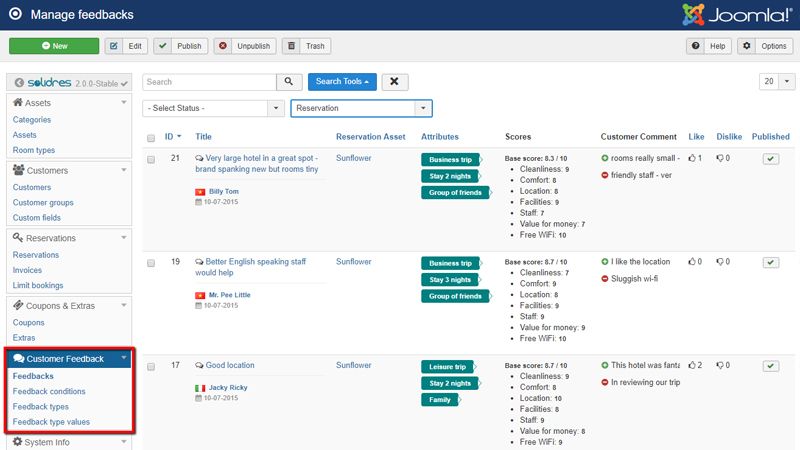
Official Solidres documentation image: “How to configure Feedback.” Downloaded for this guide; see source and attribution.
Set up the feedback structure
- Confirm the Feedback plugin is installed and enabled.
- Open Solidres → Customer Feedback and create at least one feedback type. Use types only when they support a useful reporting or service-improvement question, such as trip purpose, guest type, or length of stay.
- Add only clear, non-discriminatory values for each type.
- Configure scoring conditions/criteria that match the property’s approved service standards. Keep the scale consistent across time so comparisons remain meaningful.
- Test the form and the public display on staging before enabling review requests for guests.
Review incoming feedback
- Open Customer Feedback and locate the submitted review. Verify it belongs to the correct completed stay before acting on it.
- Read the score, criteria, free-text comment, and any selected feedback types. Record an operational issue in the property’s normal incident or improvement process.
- Check the review against the property’s published moderation rules: relevance, lawful content, personal data, abusive material, and authenticity.
- Publish an approved review, or leave it unpublished while escalating a disputed, sensitive, or potentially defamatory review to the owner.
- If your site allows a public response, use the approved brand voice; never disclose booking details, payment data, health information, or other personal information.
Before publishing
- Confirm the review is linked to a checked-out reservation and is not a duplicate.
- Redact or reject personal data that should not be public, following the property’s privacy policy.
- Preserve the original feedback and moderation record where the property’s policy or applicable law requires it.
- Do not alter a guest’s words to improve the rating. Use the published/unpublished decision and an internal response process instead.
Verify the guest journey
- Use a staging reservation, check it out, and confirm a single review request is generated.
- Open the review link as a guest and submit a test response.
- Confirm it arrives as unpublished/pending according to the configured workflow.
- Publish the test review and check its display on the correct property/asset page or Feedback module.
- Remove the test content using the property’s agreed test-data process.
TODO — verify/write locally: Document who may send a manual review request, moderation turnaround time, the exact publish/unpublish labels in this installation, whether owner replies are enabled, and the approved escalation contact for legal or privacy complaints.
For plugin configuration, criteria, and display options, see the official Feedback guide.