Configure accommodation and tourist taxes
First, identify the tax layers
Get the applicable rates and legal rules from the property’s accountant or tax authority before entering anything. This page explains where Solidres stores them; it is not tax advice.
Accommodation price
├── Property tax / VAT on the room price
├── Tourist tax line 1 (for example, city levy)
├── Tourist tax line 2 (for example, regional levy)
└── VAT on a tourist tax, only where that levy itself is taxable

Extras carry their own tax selection; they are not part of a percentage tourist-tax room-price base.
- Property tax is the ordinary accommodation tax selected in the property’s Pricing & payments settings. The Prices include tax choice controls whether entered room rates already contain that tax.
- Tourist taxes are separate named booking lines. A property can have more than one; create one per levy rather than combining legal amounts into one figure.
- VAT on a tourist tax applies only when the authority requires it. It is entered on that specific tourist-tax record and is shown separately to guests.
Before changing tax settings
- Obtain the written rate, charge basis, effective date, child exemption/reduction rules, cap, and whether it is paid online or at the property.
- Check the property, currency, ordinary room tax setting, and existing tourist-tax rates. Do not overwrite a historic rate that existing bookings rely on.
- Test the intended outcome on staging with an adult-only booking, a child booking where relevant, a cross-rate-date stay, an extra, and a deposit/payment scenario.
Set the property tax
- Open Solidres → Properties, then open the correct property and its Pricing & payments section.
- Select the ordinary Tax applicable to room prices and confirm whether entered rates include it.
- Save, then run a representative front-end search and compare the displayed room price/tax with the accountant-approved example.
Create or update a tourist tax
- Open System Info → Tourist taxes and filter to the correct property, or use the property’s Set up tourist taxes button.
- Create a separate record for each levy. Enter the guest-visible legal name, property, charge basis, fixed/percentage rate type, percentage base where needed, VAT-on-tax rate where applicable, and online/at-property collection choice.
- Leave the record unpublished while checking it. Publish only after an approved test booking gives the required line items and total.
- In Rates, add a new dated rate for a future change. Keep historic rows intact; an open-ended row runs until a newer rate takes over.
- Set exemption, reduced-age, cap, and taxed-night rules only when supplied by the authority.
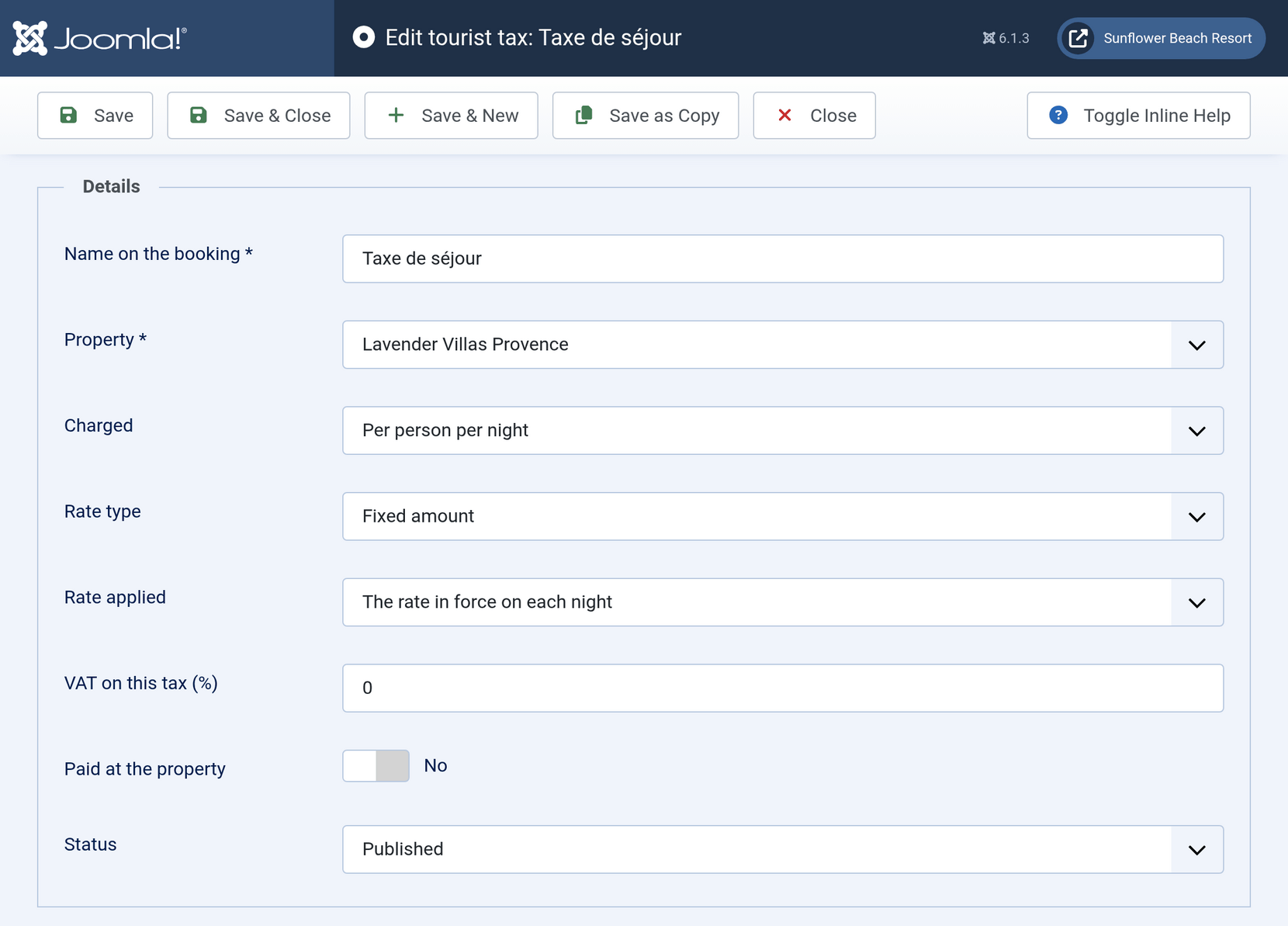
Official Solidres documentation image: “Describing the tax.” Downloaded for this guide; see source and attribution.
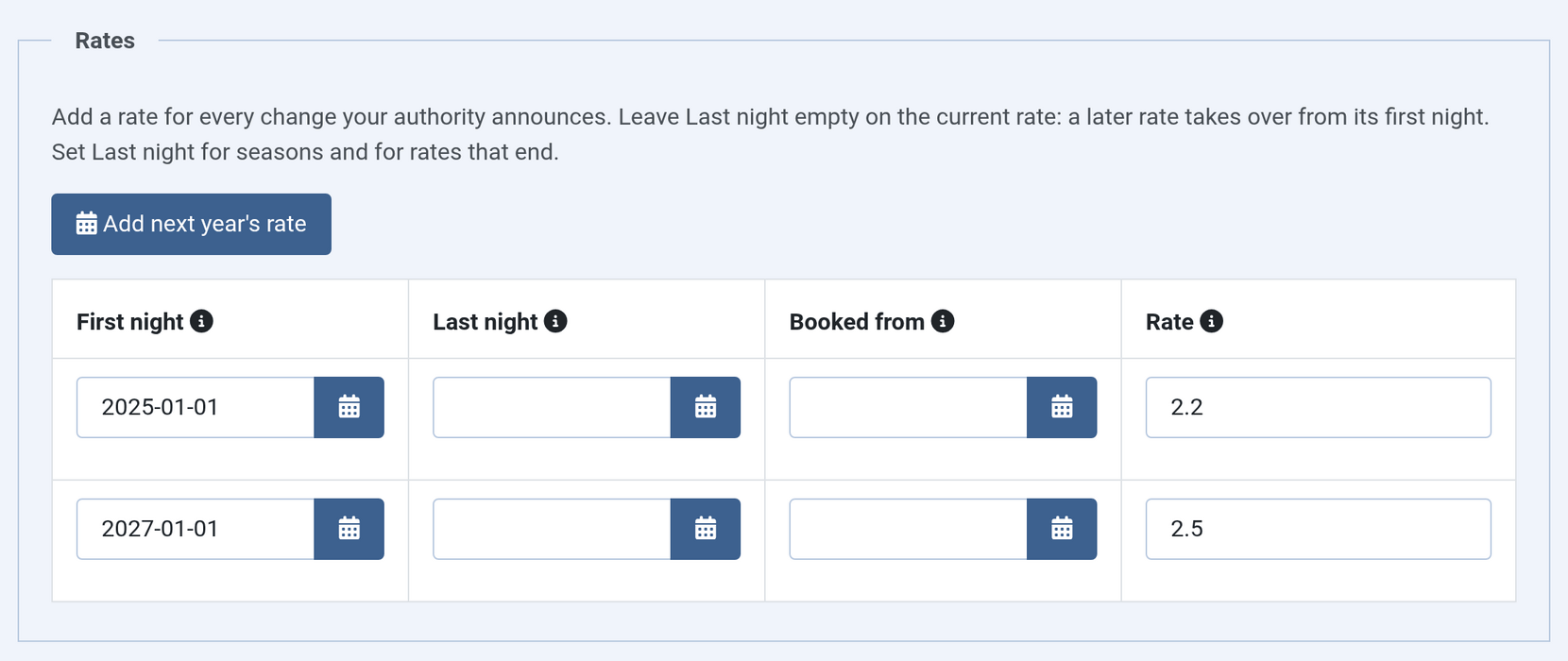
Official Solidres documentation image: “Rates, versioned by date.” Downloaded for this guide; see source and attribution.
Verify and report
- Test a booking that starts before and ends after a rate change; Solidres normally applies the rate in force on each night unless the authority requires another rule.
- Verify every levy is shown by name before payment, and confirm taxes payable at the property are excluded from gateway collection but remain visible in the booking total.
- Use System Info → Tourist tax report for authority reporting. Choose the correct property, period, and grouping; stays crossing a period are allocated night by night.
Do not make tax changes retroactively
Add a new rate for a new effective date instead of editing an old one. Escalate any tax discrepancy, migration issue, or question about refunds/credit notes to the accountant before changing a live record.
For field-level details and jurisdiction examples, read the official tourist tax guide.